Free PDF print-scale check: A4 or Letter
Download the PDF that matches your paper, then print the file at Actual Size / 100%, one page per sheet. It contains horizontal and vertical 100 mm lines, a 2-inch line and a 50 × 70 mm frame. Measure between line centres with a ruler. The PDF instructions are in English.
Download A4 PDF ↓ Download US Letter PDF ↓
This independent reference is not an app export, official ID template, hardware calibration or color test. Digital geometry was verified; no physical print was tested. All content is over 10 mm from page edges, but printer margins still vary. If either 100 mm line measures 95 mm, the output is about 95% scale. Check paper and scaling settings before changing your layout.
Print the downloaded PDF, not this webpage or a screenshot. This page’s Print button above still prints the original A4 SVG sheet.
Adobe: Actual Size / Fit · Epson: paper size / borderless expansion
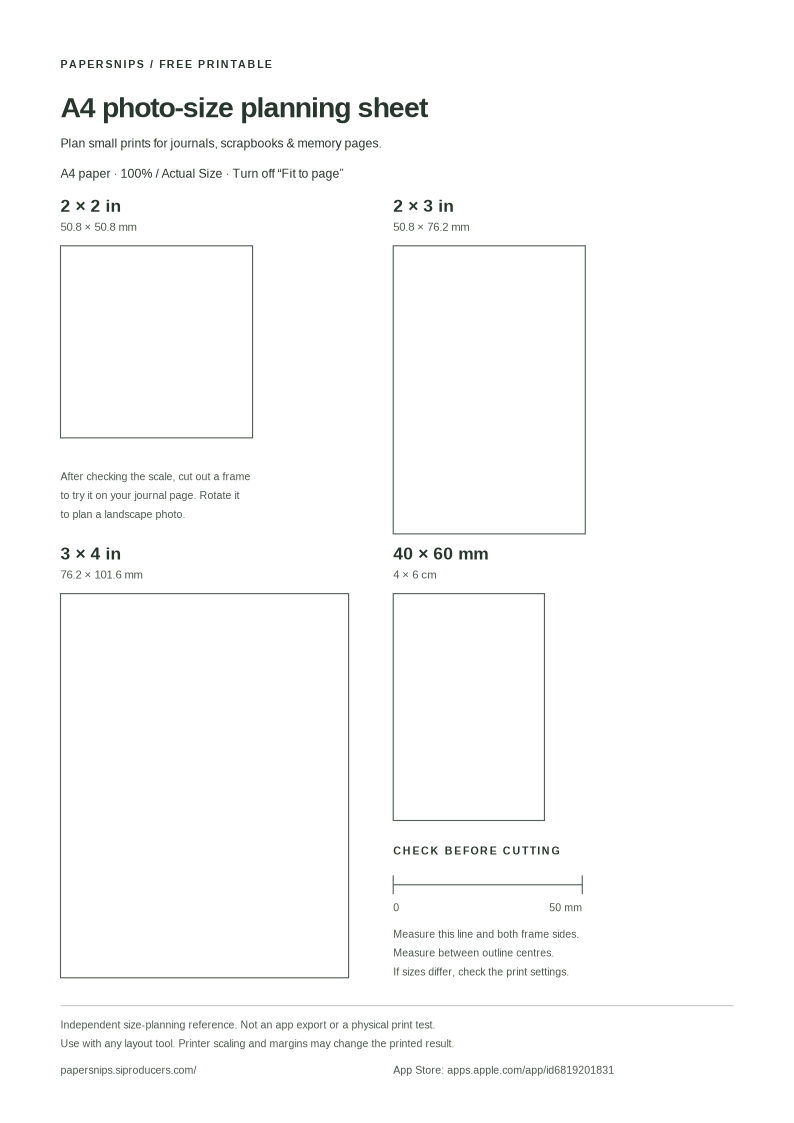
Four sizes to try on paper
- 2 × 2 inches (50.8 × 50.8 mm)
- 2 × 3 inches (50.8 × 76.2 mm)
- 3 × 4 inches (76.2 × 101.6 mm)
- 40 × 60 mm (4 × 6 cm)
The sheet also includes a 50 mm calibration line. The preview is scaled to your screen; it is not a screen-size ruler.
Print one test sheet
- Use your browser’s Print command on this page. The print layout contains only the A4 sheet. Or open the downloaded SVG in a program that preserves its physical size.
- Load and select A4, portrait (210 × 297 mm). Choose 100% / Actual Size; turn off “Fit to page” and browser headers and footers. Check that the preview shows one complete page.
- Measure the 50 mm line and both sides of the frames with a ruler, between the centres of the thin outlines. Only cut after the measurements match. If they differ, check scaling and paper settings and print another test.
Ready to add your photos?
PaperSnips for iPhone and iPad · iOS 1.5 helps arrange photos and export printable layouts. Export three different projects free; re-exporting the same project does not use another allowance. Pro and lifetime Max are optional one-time purchases; Max also offers an optional monthly auto-renewing subscription. Regional prices and billing terms are shown by Apple before purchase.